We'll also set a temporary cookie to hide this notice.
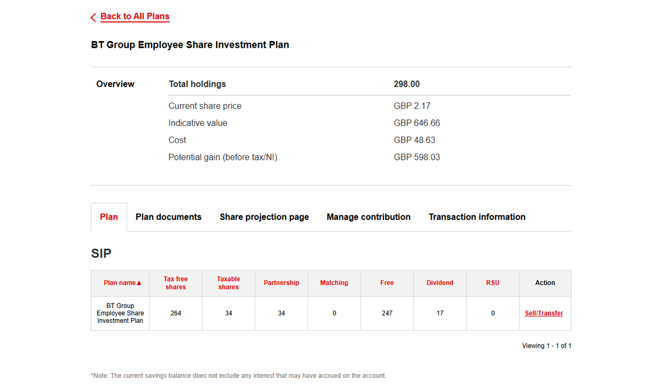
Go to your portfolio, select ‘View Plan’ next to your directshare (SIP) plan, then choose ‘Sell/Transfer’ in the ‘Action’ column.
Please DO NOT use the ‘Transact’ button under ‘Trade Shares’ in the top ribbon when in MUFG Investor Centre web portal. If you hover over ‘Trade Shares’ then the ‘Sell/Transfer’ option will be available to you here too.
Yes, unless you have been told that share dealing is restricted during a specific period.
To receive the full directshare tax benefit, keep each share in the plan for five years from its purchase date. If you sell or transfer it earlier, income tax and national insurance may apply. Please click here to view the table explaining the holding periods.
No. The share price displayed in your portfolio is based on the closing BT Group plc share price from the previous trading day and is used to provide an estimated value of your holding.
If you choose to sell your shares using the ‘Sell Now’ option, you will be provided with a live market price before confirming your sale.
If you choose to sell yours shares using the 'Next available trading day' option, confirmation of the final sale price will be provided following the trade.
This will depend on the dealing method used.
Sell Now: This is a real-time dealing option. A live market price will be displayed for you to review. If you choose to accept the price and confirm the sale within the time provided, your shares will be sold at the price quoted. Please note this method is only available for non-taxable sales.
Next available trading day: If your sale request is received before 9:00am UK time on a UK working day, your shares will normally be sold that day. Requests received after 9:00am will normally be sold on the next UK working day. Confirmation of the final sale price will be provided following the trade.
Once an instruction has been submitted, a confirmation email will also be sent confirming the details of the transaction. A sales notice will be sent to you in the post one day after the sale has completed and your sale price will be confirmed on the sales advice statement.
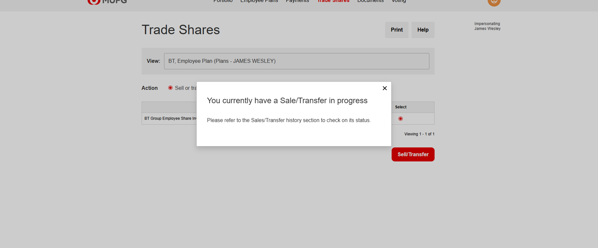
If you have sold your shares but they are still showing in your portfolio, this does not mean that the sale has not been completed.
The shares will remain visible in your portfolio until the trade has settled in the market.
Once settlement has completed, the shares will be removed from your portfolio and the sale status will update from ‘In Progress’ to ‘Completed’.
If the sale proceeds are tax-free, the proceeds will be paid to you following settlement. If the proceeds are subject to tax, they will be sent to your employer’s payroll for the appropriate deductions to be made and will then be paid to you at the next available opportunity.
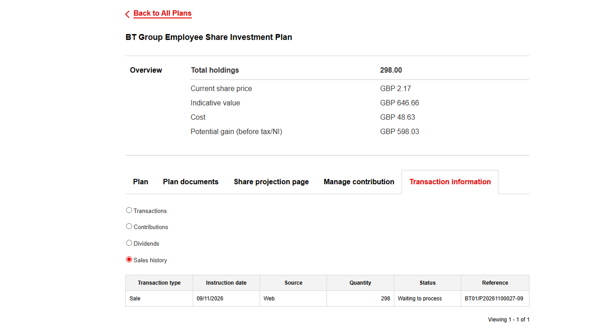
If your sale shows as ‘In Progress’, this does not mean that your shares have not been sold. The status will remain ‘In Progress’ until the trade has settled in the market.
Once settlement has completed, the status will update to ‘Completed’.
If the sale proceeds are tax-free, the proceeds will be paid to you following settlement.
If the sale proceeds are subject to tax, the proceeds will be sent to your employer’s payroll for the appropriate deductions to be made and will then be paid to you at the next available opportunity.
This will depend on the dealing method used and the taxable status:
Taxable sale | Non-taxable sale | |
Sell Now | Not available | Paid to you in 5 to 7 working days |
Next available trading day | Paid to BT in 7 to 10 working days and paid to you via the next BT payroll run | Paid to you in 7 to 10 working days |
Selling taxable shares
Taxable shares can be sold via the ‘Next available trading day’ option. Proceeds will be paid to BT in 7 to 10 working days and paid to you via the next BT payroll run, once any tax deductions have been made.
Selling non-taxable shares
When selling non-taxable shares, you can choose between two sale methods.
Sell Now: This is a real-time dealing option. A live market price will be displayed for you to review. Proceeds will be paid to you in 5 to 7 working days.
Next available trading day: If your sale request is received before 9:00am UK time on a UK working day, your shares will normally be sold that day. Requests received after 9:00am will normally be sold on the next UK working day. Proceeds will be paid to you in 7 to 10 working days.
Capital gains tax (CGT) is not payable on any increase in the value of your shares whilst held in directshare or if you sell them from directshare. However, if you choose to transfer your shares out of directshare and then sell at a later date, CGT may apply to gains above the annual allowance. Important: it is your responsibility to maintain your own records in relation to CGT. Find out more here.
As your deductions are taken from your gross pay, you won’t pay income tax or national insurance (subject to the holding periods outlined below) this rate would be equivalent to income tax and national insurance.
View InformationIt may. Shares are bought from your salary before tax, so you may pay less national insurance. If your national insurance contributions become too low, this could affect your entitlement to a range of statutory benefits and means-tested benefits or tax credits may be affected. See leaflet IR177 here: Tax treatment of Share Incentive Plans and your entitlement to benefits - GOV.UK.
If you’re subject to the BT Group share dealing code, during a closed period you can’t apply to join directshare, stop, restart, change your contributions or change your dividend payment election. When not in a closed period, you must seek share dealing clearance before submitting any instruction.
Purchases under directshare are permitted under the BT Group share dealing code and don’t require separate share dealing clearance.
All UK based employees of BT Group participating companies can join the plan from their first day of employment with BT. We will send you a welcome email with instructions on how to join.
If you're accessing through BT's single sign-on (SSO) or App Store or Google Play have your Investor Code (IVC), postcode and surname ready.
You can choose to contribute between £10 and £1,800 each tax year (or a maximum of 10% of your salary if less than £18,000). You can choose whether to pay monthly or multiple lump-sum payments. You can change, pause or restart your contributions whenever it suits you.
BT will send new starter an email with all the information in the month after they have joined. If you decide you’d like to join directshare at a later date, you can visit the BT's single sign-on (SSO) or via App Store or Google Play.
yourshare/allshare plans are historic free share awards which were made to eligible employees. The yourshare plan operated in 2020 and 2021 and the allshare plan operated before 2007.
If you received shares as part of the yourshare/allshare plans, these will be visible to you on the portal or app in the same way you view your directshare shares.
You can join the Plan in the same way as any other eligible employee. We recommend you read this information and the PSA with your parent or legal guardian.
If you want to sell or withdraw shares, or you leave employment, before you turn 18, the Trustee will usually ask your parent or legal guardian to countersign your instruction. Any proceeds will be paid into a bank account in your name.
The charges are:
Online sale: 0.5%, min £15.
Telephone sale: 0.5%, min £15.
Transfer to another broker or provider: £0
Yes. You can transfer shares to your Equiniti Financial Services Limited EasyShare account by electing to transfer to ‘Nominee’ using the Sell/ Transfer link under ‘action’ in your account.
If you do not have an Equiniti Financial Services Limited EasyShare account, Equiniti will open one for you subject to the EasyShare Terms and Conditions. You can review the terms at Equiniti Shareview | Corporate Sponsored Nominee or call +44 (0) 808 100 4141.
If you do not meet the EasyShare Terms and Conditions, you will be sent a share certificate to your home address.
Income tax and national insurance may apply if your shares have been held for less than five years. Keeping them in directshare may also protect them from CGT. Contact MUFG Corporate Markets for further details.
Yes. You can transfer shares to your Equiniti Financial Services Limited EasyShare account by instructing MUFG.
If you do not have an EasyShare account, Equiniti will open one for you subject to the EasyShare Terms and Conditions. You can review the terms at www.shareview.info/products/csn or call +44 (0) 808 100 4141.
If you do not meet the EasyShare Terms and Conditions. You will be sent a share certificate to your home address.
Income tax and national insurance may apply if your shares have been held for less than five years. Keeping them in directshare may also protect them from CGT. Contact MUFG Corporate Markets for further details.
Normally, once a year BT work with MUFG Corporate Markets and Standard Life to give you the opportunity to transfer some or all of your available shares into the BT Retirement Saving Scheme (BTRSS). Your available shares are any directshare/yourshare/allshare shares you’ve held for at least five years and any dividend shares you’ve held for at least three years.
If you’re eligible, you’ll receive instructions on how to transfer your available shares to your BTRSS.
Yes. First you will need to instruct MUFG to transfer your shares into your EasyShare account. Once the shares have settled into your EasyShare account, click here to complete Stock Transfer Form and return it to EQ, BT Group plc’s Share Registrar.
Yes. You will first need to instruct MUFG to transfer your shares to your EasyShare account. Once the shares have settled into your EasyShare account, contact EQ to arrange the onward transfer.
ISA transfers must be done within 90 days of being withdrawn from the Trust, and the value of the shares will count towards your annual ISA allowance.
For more information on transferring your shares from your EasyShare account, click here.
Yes. You can change or stop your regular contributions at any time through your MUFG Investor Centre app and portal. The change will take effect from the next available payroll and appear on your payslip. You can also make lump-sum contributions at any time during the year. If you apply or make a change to your contributions before the 9th of the month (rolling back to the next available weekday if this falls at the weekend or a bank holiday), your application or change will take effect in the same month. If you apply or make a change after, it will take effect from the following month.
Go to your portfolio, select the relevant plan, and choose manage contributions to adjust your regular payments. Then you can select transactions to view your account activity, including the transaction type, date, number of shares, and value.
Your first deduction will usually appear on the first or second payslip after your application is processed. If it is not on the second payslip, contact MUFG Corporate Markets.
Shares you have already bought through directshare are not affected.
Your contributions will continue if your pay is high enough to cover them and they stay within 10% of your pre-tax salary. You can instruct MUFG Corporate Markets to stop the deductions.
If your pay is too low, contributions will stop automatically and restart when your pay is high enough. You cannot make separate payments while payroll contributions are stopped.
You can stop, restart or change your deductions at any time via the ‘Manage Contributions’ section on the MUFG Investor Centre portal/app, and following the onscreen instructions.
Normally on the 10th working day of the month after the deduction is taken. The shares purchased will be visible on the MUFG Investor Centre portal and app within 5 working days.
To view them, go to your portfolio, select the relevant plan, and you will be able to view your contributions made from your salary into the directshare and any dividends.
Additional shares that are purchased with dividends paid on your existing plan shares. Unless you leave, your dividend shares must stay in directshare for three years from reinvestment.
There is no national insurance to pay on dividend shares and the income tax treatment for dividend shares is:
View InformationYes. When BT pays a dividend, it will be paid in cash to your bank account unless you choose to have your dividend reinvested to purchase additional shares. After each payment, MUFG Corporate Markets will email or write to tell you that the details are available on MUFG Investor Centre. Check the dividend latest allowance at GOV.UK. For advice about your tax position, speak to a qualified independent financial adviser.
For dividends paid after the move to MUFG, the payment method will show as ‘BACS’ if the dividend was paid to your bank account, or ‘Reinvested’ if the dividend was reinvested. Dividends paid by the previous administrator EQ will show as ‘Unknown’.
Go to your portfolio, select the relevant plan then 'View Plan'. Select the 'Transaction information' tab and click on 'Dividends'.
MUFG Corporate Markets will send you an annual statement each April by email or by post. You can also view your shares via MUFG Investor Centre app or portal at any time.
If you apply or make a change to your contributions before the 9th of the month (rolling back to the next available weekday if this falls at the weekend or a bank holiday), your application or change will take effect in the same month. If you apply or make a change after, it will take effect from the following month.
Yes. As a BT shareholder, your shares are held on the register and you can vote via proxy voting for BT’s Annual General Meeting.
You should ensure your personal details are kept up to date on My HR. Updates will be fed automatically to MUFG on a monthly basis and will update within 5 working days of receipt of the file on the MUFG Investor Centre app and portal.
Before leaving, check that you can access your account, your personal email address and bank details are correct, and you understand what happens to your directshare (SIP). Guidance can be found here BT Share Plans | Leaving BT.
If you leave BT, your directshare shares must leave the plan. MUFG Corporate Markets will contact you with your options and next steps. Any tax due will depend on why you leave and how long you have held the shares. Guidance can be found here BT Share Plans | Leaving BT.
A dividend is a portion of a company's net profits or surplus distributed to its shareholders as a reward for owning its stock, typically paid in cash or additional shares.
When BT pays dividends, you may be eligible to receive a payment based on the number of shares you hold on an agreed date. Your dividend payment can be paid to you in cash, or used to buy more BT shares, which are called Dividend Shares.
The current value of a share, usually based on prices quoted on the London Stock Exchange.
A share bought through a Share Incentive Plan (SIP) using money deducted from an employee’s salary.
The contract between an employee and employer when the employee joins directshare.
Approval that some employees must get before buying or selling shares.
A valuable document showing how many shares a shareholder legally owns. It is evidence of ownership and must be held in a secure place.
The total number of shares a shareholder owns.
The date a share purchase or sale is completed in the market.
A person or organisation that holds and manages assets for beneficiaries.
MUFG Corporate Markets (UK) Limited administer the directshare. MUFG Corporate Markets duties include processing share applications, maintaining investors’ accounts and issuing statements to investors.
By law, directshare Shares have to be held in a Trust. The company appointed by MUFG Corporate Markets (UK) Limited to run the Trust is MUFG Corporate Markets Trustees (UK) Limited. The Trustee is a part of the MUFG Pension & Market Services group of companies whose registered offices are Central Square, 29 Wellington Street, Leeds, LS1 4DL. Registered in England and Wales number 02605568.
The Trust Deed and Plan Rules are the governing documents of the directshare. If you’d like a copy of the Trust Deed and Plan Rules, please contact MUFG Corporate Markets at Central Square, 29 Wellington Street, Leeds, LS1 4DL. If you notice differences between this microsite and the Trust Deed, Plan Rules and governing legislation, you should consider the terms of the Trust Deed, Plan Rules and governing legislation as correct.

Please read our cookie notice for full details of the types and details of cookies used on this website or to change your cookie settings.
© 2026 MUFG Corporate Markets. All rights reserved.
A part of MUFG Corporate Markets, a division of MUFG Pension & Market Services